Creating a fault centerline from a fault polygon
Fault gap polygons are imported in most cases from a mapping package as a file containing a number of shapes or polylines that describe the intersections of faults with a specific horizon. Depending on the mapping packages, the different polygons might already be identified in the file with different fault names. Not all packages, however, support this feature.
If a fault gap polygon consists of both footwall and hanging wall of the fault interpretation, you create the fault surface by triangulating a surface through a polyline in the center of these two sides. You can use this form to create such a centerline.
If a fault gap polygon set you selected contains more than one polyline, you can create either a centerline object that contains all centerlines of the fault gap polygon set, or individual centerline objects for all polygons.
If you need to create a fault from a fault centerline or perform triangulation of polyline or point sets, see the other triangulation tools.
- Select a model.
-
From the list of the available fault gap polygons in the model, select the fault polygons by checking the individual check boxes, or by right-clicking the list and making a selection from the context menu.
Create separate centerline for each fault gap Select to create a new polyline object for all individual centerlines that are created. This is useful when different triangulation settings are required for different centerlines, intersections of different faults with the horizon for example.
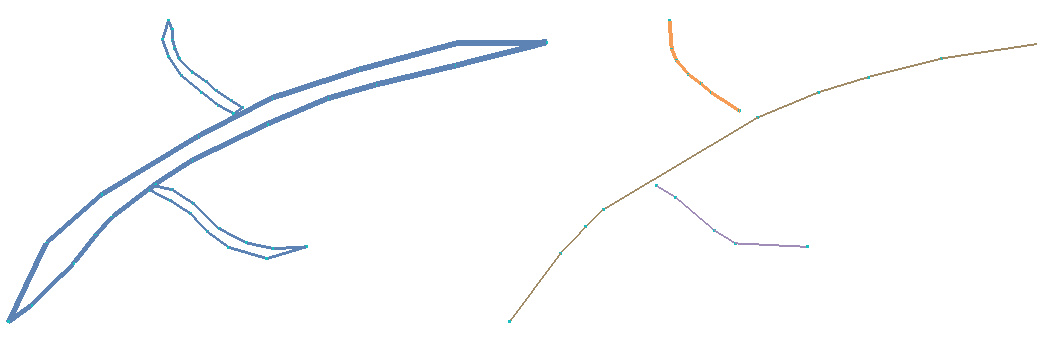
Centerline creation: Input polyline set and resulting center lines click to enlarge
If you use this, the fault gap polygon is updated and shows the newly created center lines. You can also select the centerline in the JewelExplorer. This allows you to select individual fault gap polygons/centerlines and define different settings for triangulation.